
S4000 Axial Inserter Operator Training & Software Programming Guide by Southern Machinery
Program, operate, and change over the S4000 axial auto inserter: software editing, USB/Excel data, clinch settings, and operator training from Southern Machinery.
Sep 2, 2026 · Updated Sep 2, 2026 · Southern Machinery

S4000 Axial Inserter Operator Training & Software Programming Guide by Southern Machinery
The S4000 axial auto-insertion machine from Southern Machinery inserts axial-lead components (resistors, diodes, jumper wire) at speeds rated up to 22,000 CPH. This guide explains how the machine is programmed, operated, and changed over — covering software editing, USB/Excel data import, clinch settings, changeover workflow, and the operator training Southern Machinery provides.
What is this machine used for?
The S4000 is a THT auto-insertion machine used to place axial components — resistors, diodes, and jumper wire — into PCBs automatically. Where a manual insertion line assigns workers to push each lead through its hole, the S4000 feeds the components, cuts and forms the leads, inserts them into the PCB, and clinches the leads under the board in one cycle. Southern Machinery rates it up to 22,000 CPH and designs it for both offline and inline operation. It is a core machine for EMS, ODM, power supply, LED lighting, and household appliance factories that still depend on manual axial insertion.
Why operator training and programming determine real ROI
A rated speed of 22,000 CPH only becomes factory output if programs are correct and changeovers are quick. Three operator skills determine real-world throughput and quality on the S4000:
- Program editing — loading the correct insertion program for each PCB and verifying component data.
- Component and clinch setup — matching lead span, insertion angle, and clinch parameters to the actual parts.
- Changeover discipline — a structured swap from one PCB program to the next without trial-and-error rework.
Southern Machinery publishes official training videos for the S4000, including a software edit training video that walks operators through program editing on the machine. The same training is part of the free installation and training package that comes with the equipment.
Verified S4000 platform facts an operator works with
These parameters come from the official Southern Machinery S4000 product documentation:
- Speed: rated up to 22,000 CPH (nominal 20,000 CPH)
- Positioning: imported precision ball-screw and AC servo system, positioning accuracy <0.001mm
- Vision system for positioning and insertion alignment
- Insertion angles: 0°, 90°, 180°, and 270°
- Component lead span: 5–22mm
- Clinch angle: adjustable 0°–45°
- Clinch lead length: adjustable 1.28mm (0.050 in.) to 1.80mm (0.071 in.), measured from the center of the insertion hole to the end of the lead
- Data transfer: USB port, Excel format compatible
- Frame: integral forming cast iron machine frame
- Detection: missing-component detection and insertion-leakage detection
- Optional: second-level component centering mechanism
Software editing and data import: what to learn first
The S4000 accepts PCB insertion programs through a USB port and works with data in Excel format. For a new product, the operator (or the programming engineer) imports the component list and coordinates, checks the program on the vision system, and runs a first article before production.
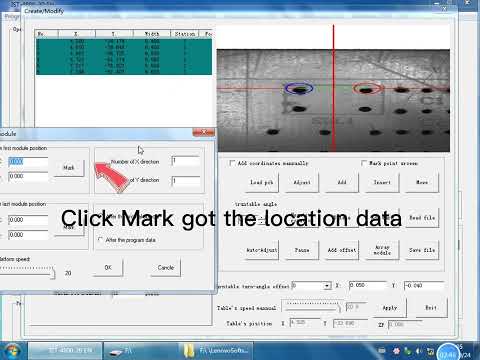
The key learning points covered in Southern's S4000 software training video are:
- How to open and edit an existing program on the machine
- How to import component data in Excel format without transmission errors — the machine includes a protection system designed to prevent USB data transmission errors and PCB damage
- How to verify insertion positions and angles before running
- How to store and recall programs for repeat orders — critical for EMS factories that re-run the same boards every month
Clinch settings and insertion parameters
The clinch unit is what keeps a THT component in place until wave soldering. On the S4000, the clinch angle is adjustable from 0° to 45°, and the clinch lead length is adjustable from 1.28mm to 1.80mm, measured from the center of the insertion hole to the end of the lead. The right clinch setting depends on hole size, pad design, and board thickness — your process engineer should verify these against the PCB design before first article.
Operators also configure the insertion angle per component (0°, 90°, 180°, 270°) and confirm that the component lead span (5–22mm) matches the feeder setup.
Changeover workflow for high-mix EMS production
For an EMS line running multiple PCBs per shift, changeover is where output is won or lost. A disciplined S4000 changeover looks like this:
- Confirm the next PCB program is loaded and verified
- Check that axial components and jumper wire in the feeders match the bill of materials
- Adjust or confirm clinch parameters for the new board
- Run a first article and inspect insertion and clinch quality
- Release to production
Because the machine handles axial components and jumper wire simultaneously — and can insert jumper wire independently — a mixed program does not require a separate jumper line. Southern Machinery states that direct routing of the tubular jump line into the PCB saves about one third of the jumper line material.
Typical application scenarios
- EMS and ODM THT lines — axial resistors, diodes, and jumpers across many board types
- Power supply and ballast PCB assembly — dense axial component layouts
- LED lighting and driver boards — standard axial parts plus jumper routing
- Household appliance control boards — TV, washing machine, and other white goods PCBs
- Jumper-heavy designs — boards where the S4000's independent jumper insertion replaces manual jumper installation
How the S4000 fits into a complete PCB assembly line
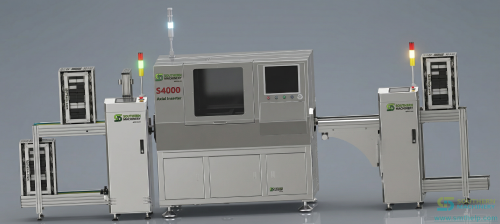
The S4000 works as an offline machine or inline with board handling equipment:
- Upstream: magazine loader / PCB loader feeds boards
- Insertion: S4000 inserts axial components and jumper wire; radial components and odd-form parts are handled by complementary machines (S3000/S3010A radial, S7000/S7040 odd form)
- Downstream: wave soldering (e.g., S-WS450) solders the clinched leads
- After soldering: lead cutting, cleaning, and inspection (AVI/AOI) close the line
Southern Machinery (Shenzhen, founded 2011, serving 237+ global customers) supplies SMT, THT, wave soldering, board handling, and inspection equipment as whole-line solutions — so the S4000 can be quoted as part of a complete THT line rather than a single island of automation.
Key configuration checklist before you buy
Use this checklist when requesting a quotation. Only items verified in Southern's published documentation are listed as fixed values; everything else must be confirmed with the manufacturer for your specific PCBs.
- Component lead span: confirm your axial parts fit the 5–22mm range
- Insertion angles: 0°, 90°, 180°, and 270° are available; confirm your board needs no intermediate angles
- Clinch: confirm required clinch angle (0°–45° range) and clinch lead length (1.28–1.80mm range) against hole and pad design
- PCB dimensions and panelization: confirm maximum board size with Southern Machinery
- Feeding format: confirm axial tape/reel format and jumper wire supply with the manufacturer
- Operation mode: offline vs. inline; if inline, plan loader/unloader and conveyor integration
- Options: second-level component centering mechanism, loader, MES data integration
- Detection: missing-component and insertion-leakage detection are standard; confirm which detection coverage you need
ROI, quality, and throughput considerations
- Labor: Southern Machinery states one operator can replace forty manual plug-in workers on the S4000 — evaluate against your local labor cost and shift pattern
- Quality: automatic insertion with vision alignment and clinch control reduces wrong-part, wrong-orientation, and missing-lead defects that drive rework in manual lines
- Consistency: clinch parameters are repeatable board after board, which stabilizes the downstream wave soldering process
- Throughput: rated up to 22,000 CPH; real output depends on program quality, changeover frequency, and component mix
FAQ
What components can the S4000 insert?
The S4000 inserts axial-lead components — resistors, diodes, and jumper wire — with a lead span of 5–22mm, at insertion angles of 0°, 90°, 180°, and 270°.
How is the S4000 programmed?
Programs are loaded through a USB port in Excel-compatible format. Operators edit programs on the machine, verify positions with the vision system, and store programs for repeat orders. Southern Machinery publishes an official software edit training video.
Can the S4000 insert jumper wire?
Yes. It handles axial components and jumper wire simultaneously and can insert jumper wire independently, which removes a separate manual jumper operation.
What clinch options does the S4000 offer?
Clinch angle is adjustable 0°–45° and clinch lead length is adjustable from 1.28mm to 1.80mm, measured from the center of the insertion hole to the end of the lead.
Does Southern Machinery provide operator training?
Yes. Free installation and training are included with the machine, and official S4000 training videos (including software editing and machine operation) are published on the Southern Machinery YouTube channel.
Can the S4000 be integrated into an existing SMT/THT line?
Yes. It operates offline or inline with board handling equipment, and Southern Machinery can quote it as part of a complete THT line with wave soldering, board handling, and inspection equipment.
Get configuration advice from Southern Machinery
Southern Machinery is a Shenzhen-based SMT/THT PCB assembly automation equipment manufacturer founded in 2011, serving 237+ global customers across EMS, ODM, power supply, LED, automotive, and appliance manufacturing. Contact the sales and service team for S4000 configuration advice, a line layout proposal, or a return-on-investment analysis for replacing manual axial insertion:
- Email: jasonwu@smthelp.com | Phone/WhatsApp: +86 13602562576
- Product catalogs and PDFs: https://file.autoinsertion.com
- Machine photos and albums: https://ph.smthelp.com
- Official website: https://www.smthelp.com
Comments